Add two fractions from separate fields

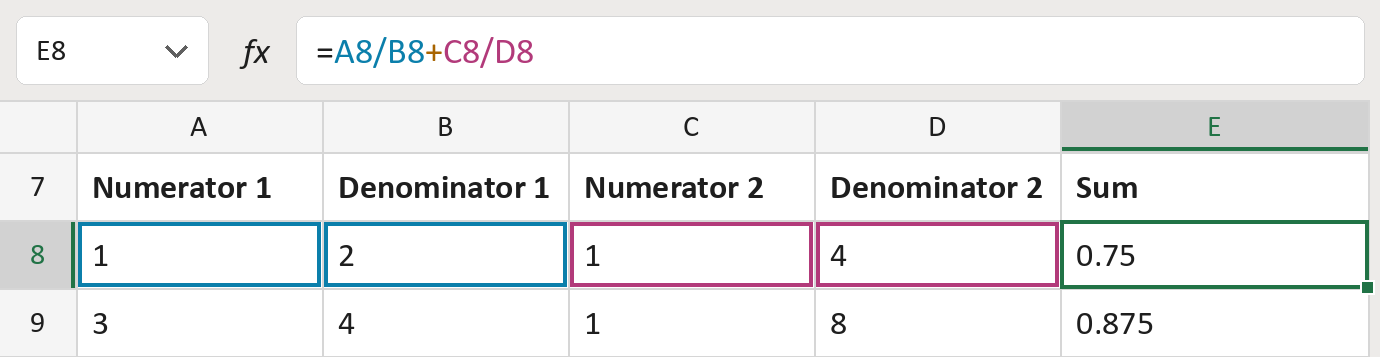
Add 1/2 and 1/4, each typed as a top and bottom number, to get 0.75.
What you'll make
The formula

| Number | Part | What it does | Result so far |
|---|---|---|---|
| 1 | A8/B8 | Divides the first top number by its bottom number. | 0.5 |
| 2 | + | Adds the two fractions together. | 0.5 + … |
| 3 | C8/D8 | Divides the second top number by its bottom number. | 0.25, so 0.75 |
Excel divides before it adds, so each fraction is worked out first.
=A8/B8+C8/D8How to use it
Yellow bar at the top? Click Enable Editing.
- See it work. The Example tab shows 20 made-up examples with the formula already in.
- Use your own numbers. Paste the two top and bottom numbers into columns A to D of the Template tab. The sums fill in by themselves.
- Move them into your letter. Copy the results. Then use Paste Special and choose Values.
Before you send
Make sure both fractions measure the same thing, like inches. Some sums show a tiny rounding difference.
Microsoft's help: Calculation operators in Excel