Merge a few test letters before the whole mailing

Make5 minutes
The problem
You want to check a few letters before you make the whole mailing.
Why it helps
You can check a few tricky rows before you make every letter. Nothing goes to the printer, and your main letter doesn't change.
Do it
-
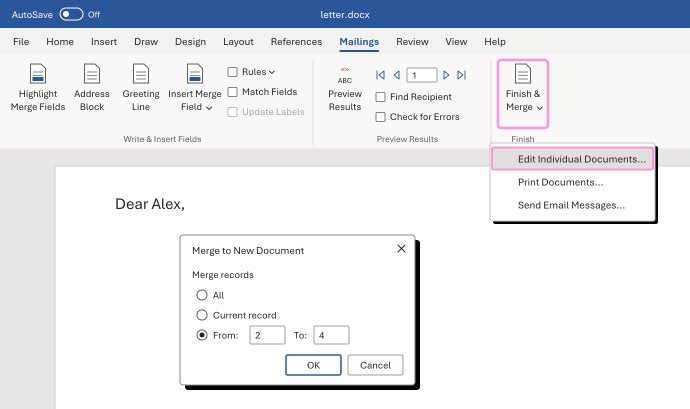
On the Mailings tab, click Finish & Merge, then Edit Individual Documents.
-
Choose From, and type the first and last record numbers, like 2 and 4. Click OK.
-
Word opens a new document with only those letters. Check them.
On a Mac, there's no From box. Set Merge Range on the Mailings tab to Custom, From 2 To 4, first. Then click Finish & Merge, then Edit Individual Documents.
Watch for
Record numbers follow your list's current sort and filter. They aren't member IDs or page numbers. Check the names in the test letters before you trust them.