Fix labels that repeat the same name

Make5 minutes
The problem
Every label on the sheet shows the same name.

Why it happens
Each label after the first needs a Next Record rule. It tells Word to move to the next row. Without it, Word puts the same row on more than one label.
Fix it
-
Open your label sheet, set up with Start Mail Merge › Labels. Click in the first label and check that it has your fields.
-
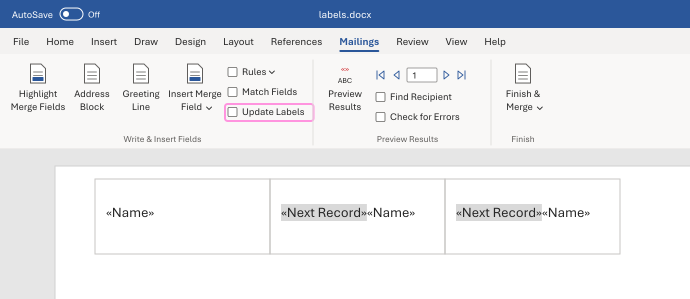
On the Mailings tab, click Update Labels. Word copies the first label to all the others.
-
Each label after the first should now start with «Next Record». The first label shouldn't have one.
-
Click Preview Results. Each label should show a different name.
Watch for
Typing «Next Record» doesn't work, because it's only text. If a label is missing it, click Rules, then Next Record.
Tested in: Word for Windows and Mac
Microsoft's help: NEXT field · Print labels for your mailing list