Get a name part by its word position

Turn Ava Marie Reed and position 2 into Marie.
Download Excel templateMicrosoft 365
What you'll make
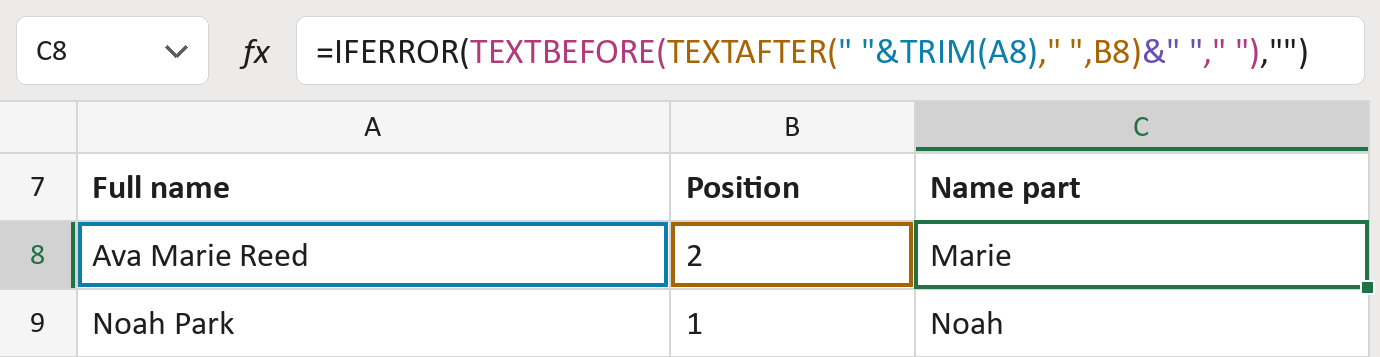
The formula
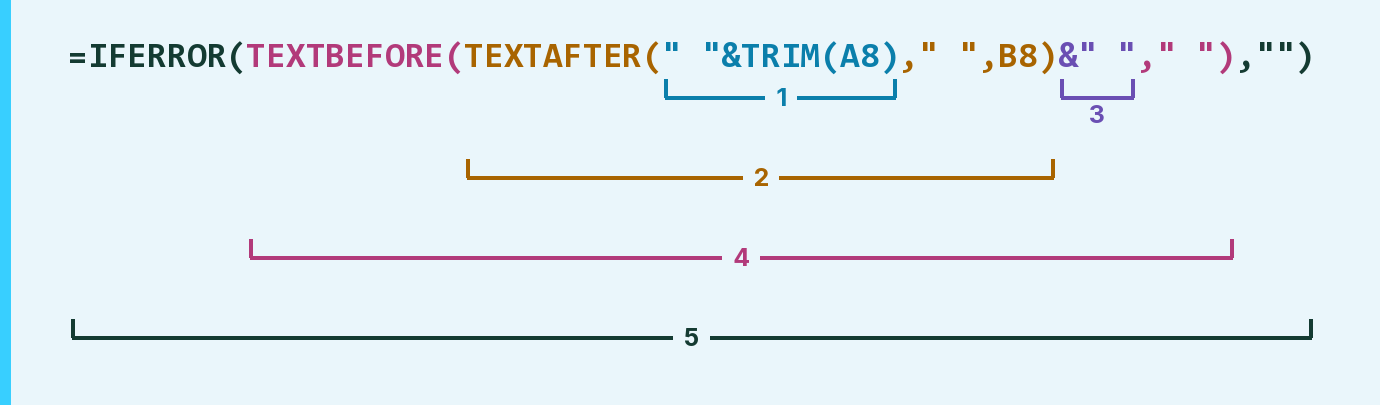
| Number | Part | What it does | Result so far |
|---|---|---|---|
| 1 | " "&TRIM(A8) | Tidies the spaces and puts one space in front. | " Ava Marie Reed" |
| 2 | TEXTAFTER( … ," ",B8) | Skips to the word at the chosen position. | "Marie Reed" |
| 3 | &" " | Adds a space at the end, so the last word has one. | "Marie Reed " |
| 4 | TEXTBEFORE( … ," ") | Keeps what comes before the next space. | "Marie" |
| 5 | IFERROR( … ,"") | Shows nothing when the position is empty or too big. | "Marie" |
Each bracket wraps the one above it, so Excel works from the inside out.
=IFERROR(TEXTBEFORE(TEXTAFTER(" "&TRIM(A8)," ",B8)&" "," "),"")How to use it
Yellow bar at the top? Click Enable Editing.
- See it work. The Example tab shows 20 made-up names with the formula already in.
- Use your own names. Paste names into column A of the Template tab and the word position you want into column B. The name parts fill in by themselves.
- Move them into your letter. Copy the results. Then use Paste Special and choose Values.
Before you send
Words are counted by spaces from the left, so de la Cruz counts as three words. A position past the last word leaves the cell blank.
Route: Get names ready for the letter
Microsoft's help: TEXTAFTER function