Replace nonbreaking spaces in names

Fix the hidden spaces that TRIM can't remove.
What you'll make
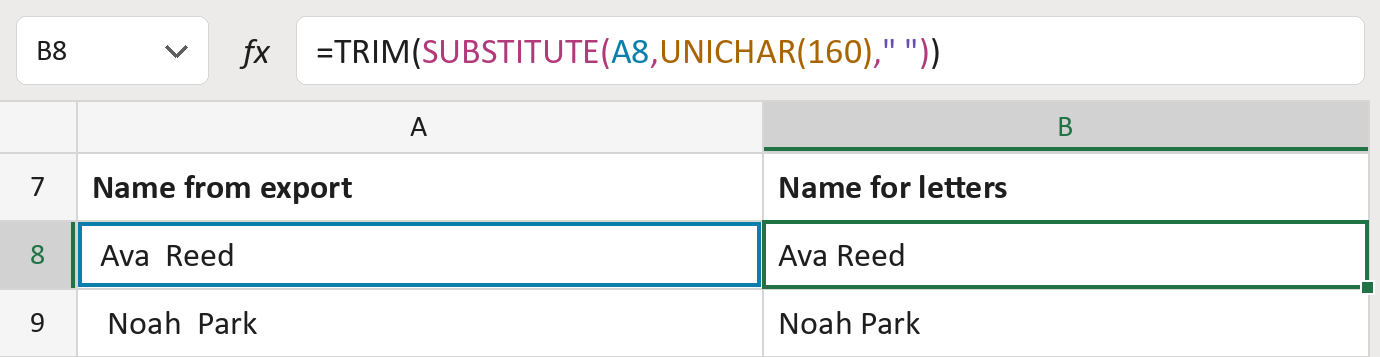
The formula
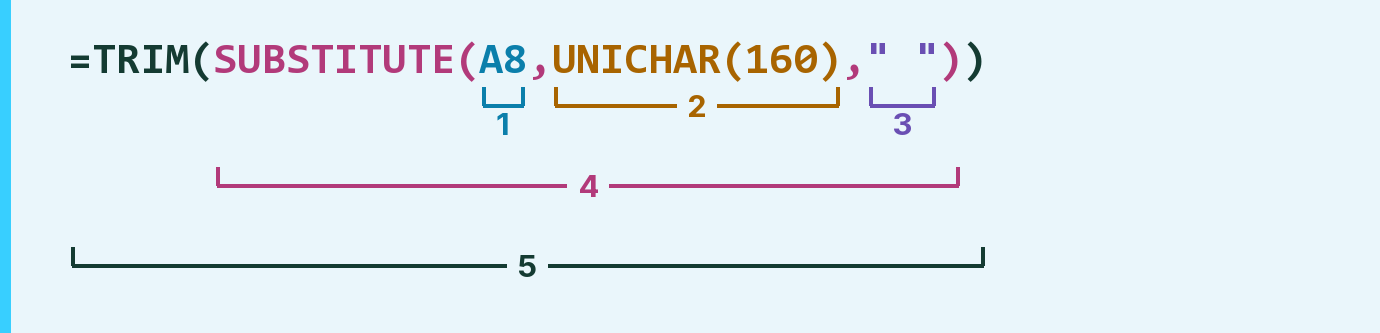
| Number | Part | What it does | For row 8 |
|---|---|---|---|
| 1 | A8 | The name from your export. Each · is a hidden space. | "·Ava··Reed·" |
| 2 | UNICHAR(160) | The nonbreaking space. It looks like a space, but TRIM can't see it. | · |
| 3 | " " | An ordinary space. | " " |
| 4 | SUBSTITUTE( … ) | Swaps every hidden space for an ordinary one. | " Ava Reed " |
| 5 | TRIM( … ) | Removes the extra ordinary spaces. | "Ava Reed" |
SUBSTITUTE works first, then TRIM tidies up.
=TRIM(SUBSTITUTE(A8,UNICHAR(160)," "))How to use it
Yellow bar at the top? Click Enable Editing.
- See it work. The Example tab shows 20 made-up names with the formula already in.
- Use your own names. Paste names into the green column of the Template tab. Clean names fill in by themselves.
- Move them into your letter. Copy the results. Then use Paste Special and choose Values.
Before you send
This fixes nonbreaking spaces only. Tabs, line breaks and other odd characters need a different fix. Check the names before you send.
Route: Get names ready for the letter
Microsoft's help: TRIM function