Write a duration as days, hours, minutes

Turn the duration 49:30 into 2d 1h 30m, keeping every full day.
What you'll make
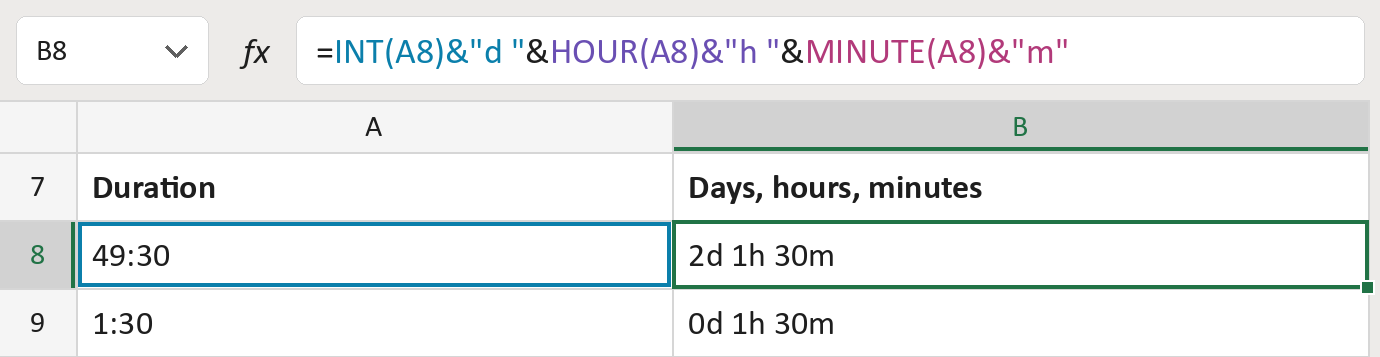
The formula

| Number | Part | What it does | Result so far |
|---|---|---|---|
| 1 | INT(A8)&"d " | Counts the whole days, then adds d. | "2d " |
| 2 | HOUR(A8)&"h " | Adds the hours left over, then h. | "2d 1h " |
| 3 | MINUTE(A8)&"m" | Adds the minutes left over, then m. | "2d 1h 30m" |
Excel counts time in days, so 49:30 is 2 whole days plus 1:30. Each part keeps its own letter.
=INT(A8)&"d "&HOUR(A8)&"h "&MINUTE(A8)&"m"How to use it
Yellow bar at the top? Click Enable Editing.
- See it work. The Example tab shows 20 made-up examples with the formula already in.
- Use your own durations. Paste durations into the green column of the Template tab. The labels fill in by themselves.
- Move them into your letter. Copy the results. Then use Paste Special and choose Values.
Before you send
Seconds are left off, so 1:30:45 shows as 0d 1h 30m. Check durations where seconds matter.
Microsoft's help: INT function