Build a fractional house-number label

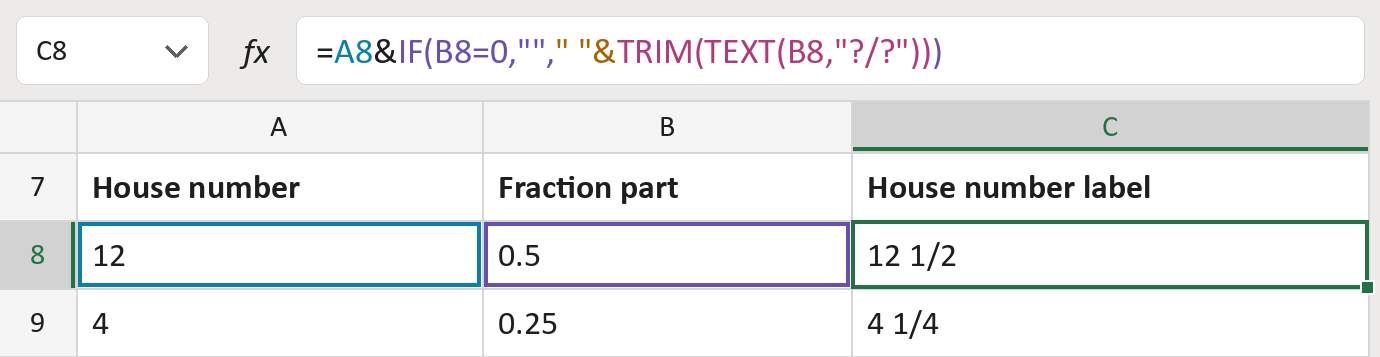
Turn house number 12 and 0.5 into 12 1/2 for an address line.
What you'll make
The formula

| Number | Part | What it does | Result so far |
|---|---|---|---|
| 1 | A8 | The house number, kept as typed. | "12" |
| 2 | " "& | Adds a space before the fraction. | "12 " |
| 3 | TRIM(TEXT(B8,"?/?")) | Writes 0.5 as a fraction, here 1/2. | "12 1/2" |
| 4 | IF(B8=0,"", … ) | Leaves the fraction off when it is 0. | "12 1/2" |
The ? marks ask for one digit above and below the line. A fraction of 0 or an empty cell gives the house number alone.
=A8&IF(B8=0,""," "&TRIM(TEXT(B8,"?/?")))How to use it
Yellow bar at the top? Click Enable Editing.
- See it work. The Example tab shows 20 made-up examples with the formula already in.
- Use your own numbers. Paste house numbers into column A and their fractions, like 0.5, into column B of the Template tab. The labels fill in by themselves.
- Move them into your letter. Copy the results. Then use Paste Special and choose Values.
Before you send
Use fractions with a one-digit bottom number, like 0.5 or 0.125. Others, like 0.3, become the nearest one (2/7).
Microsoft's help: TEXT function