Write a value in eighths like 4/8

Turn 0.5 into 4/8 and 1.25 into 1 2/8, always over 8.
What you'll make
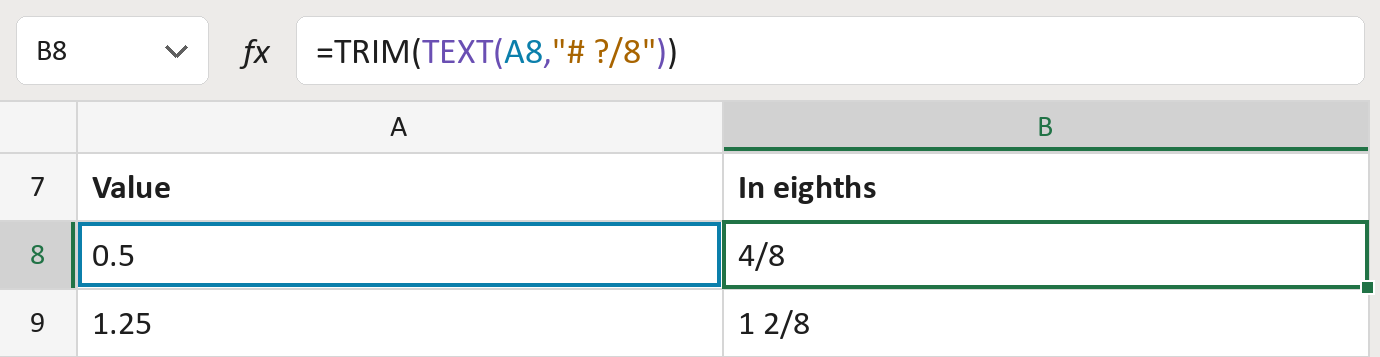
The formula
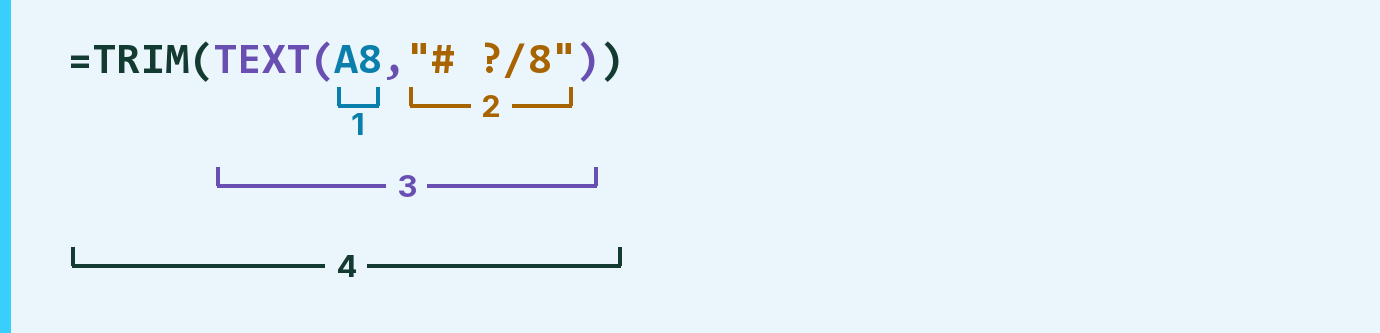
| Number | Part | What it does | Result so far |
|---|---|---|---|
| 1 | A8 | The value, like 0.5. | 0.5 |
| 2 | "# ?/8" | The pattern: whole number, then a fraction over 8. | "# ?/8" |
| 3 | TEXT( … ) | Writes the value in eighths, without reducing 4/8 to 1/2. | " 4/8" |
| 4 | TRIM( … ) | Removes the extra space. | "4/8" |
Parts 1 to 3 work from the inside out, then TRIM tidies the result. The value in the cell doesn't change.
=TRIM(TEXT(A8,"# ?/8"))How to use it
Yellow bar at the top? Click Enable Editing.
- See it work. The Example tab shows 20 made-up examples with the formula already in.
- Use your own values. Paste values, as numbers, into the green column of the Template tab. The results fill in by themselves.
- Move them into your letter. Copy the results. Then use Paste Special and choose Values.
Before you send
Values between eighths get rounded to the nearest eighth. Check your values are exact eighths first.
Microsoft's help: TEXT function