Pad a code with zeros to a set width

Turn the code A7 into 00A7 for a width of 4, keeping letters and zeros.
What you'll make
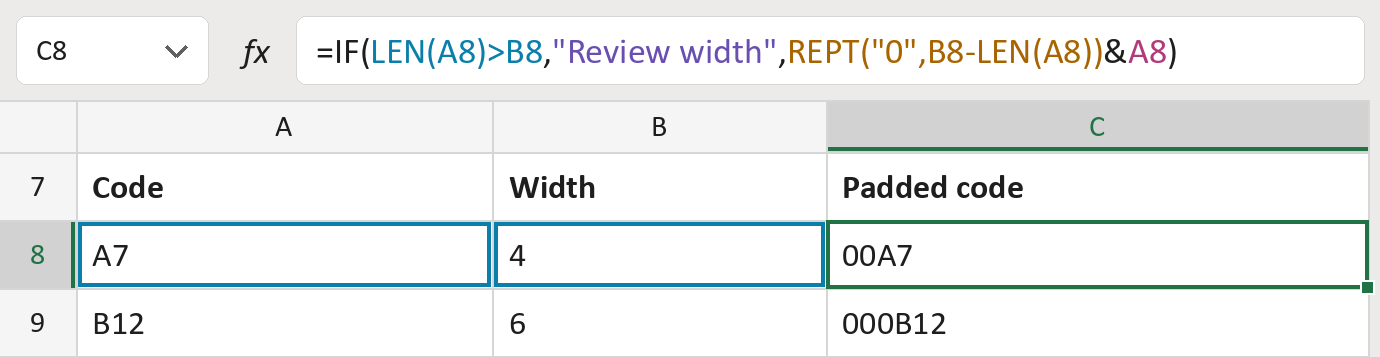
The formula

| Number | Part | What it does | Result so far |
|---|---|---|---|
| 1 | LEN(A8)>B8 | Checks if the code is longer than the width. | No, 2 is not more than 4 |
| 2 | "Review width" | Shown when the code is too long. | Not used for row 8 |
| 3 | REPT("0",B8-LEN(A8)) | One zero for each missing place. | "00" |
| 4 | A8 | The code itself, added after the zeros. | "00A7" |
| 5 | IF( … ) | Uses part 2 if part 1 says yes, else parts 3 and 4. | "00A7" |
Read it left to right. The & joins the zeros and the code. The codes here are made-up.
=IF(LEN(A8)>B8,"Review width",REPT("0",B8-LEN(A8))&A8)How to use it
Yellow bar at the top? Click Enable Editing.
- See it work. The Example tab shows 20 made-up examples with the formula already in.
- Use your own codes. Paste codes, stored as text, and the width each needs into the green columns of the Template tab. The padded codes fill in by themselves.
- Move them into your letter. Copy the results. Then use Paste Special and choose Values.
Before you send
Pad only codes whose system asks for zeros in front. A code that's too long is flagged, not cut.
Microsoft's help: REPT function