Put written answers into one table

Send10 minutes
The problem
Answers came back in separate emails, each in the person's own words.
Why it helps
People answer in their own words. One row per reply, with the original text beside the fields you need, lets someone check every answer.
Do it
-
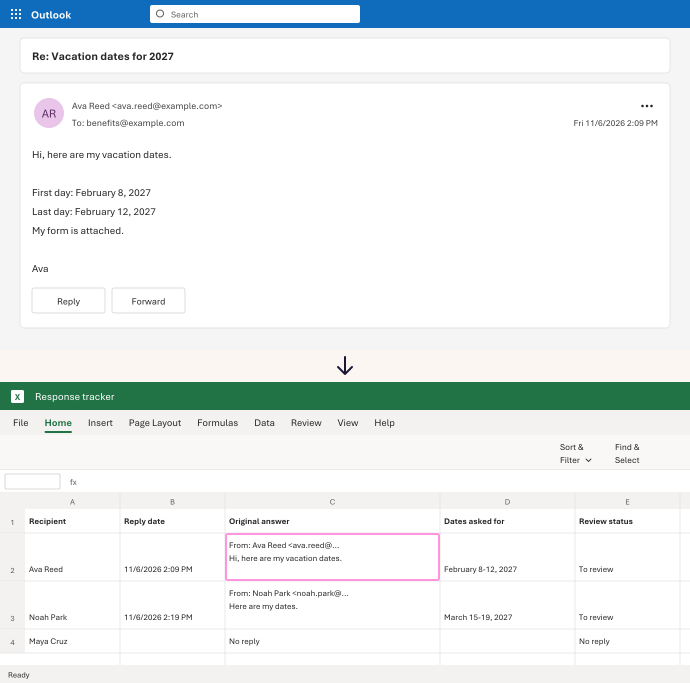
In Excel, make a table with Recipient, Reply date, Original answer, Dates asked for and Review status.
-
Open a reply in the Outlook on the web reading pane. Press Ctrl+A, then Ctrl+C.
-
In Excel, click that person's Original answer cell. Press F2, then Ctrl+V.
-
Type the dates from that text into Dates asked for. Set Review status to your own label, like To review.
-
Add a row for each person who hasn't replied, marked No reply found.
In our test, 4 replies and 1 missing reply became 5 rows. A reply of almost 11,000 characters stayed whole in one cell.
Watch for
The copy also picks up the email's header text, not only the answer. Keep the pasted block as it is, and type what you need into its own column. We found no way to export a folder of emails to Excel. File › Download saves one email at a time.
For: Outlook on the web and Excel