Use renewal wording only in renewal letters

Make5 minutes
The problem
One letter goes to two groups that need different sentences.

Why it happens
One letter goes to two groups that need different sentences. Two copies of the letter are twice the work to keep in step.
Fix it
-
Check that your list has a column naming the group for each row, like Audience, with Renewal or Enrollment.
-
In your letter, click where the sentence goes.
-
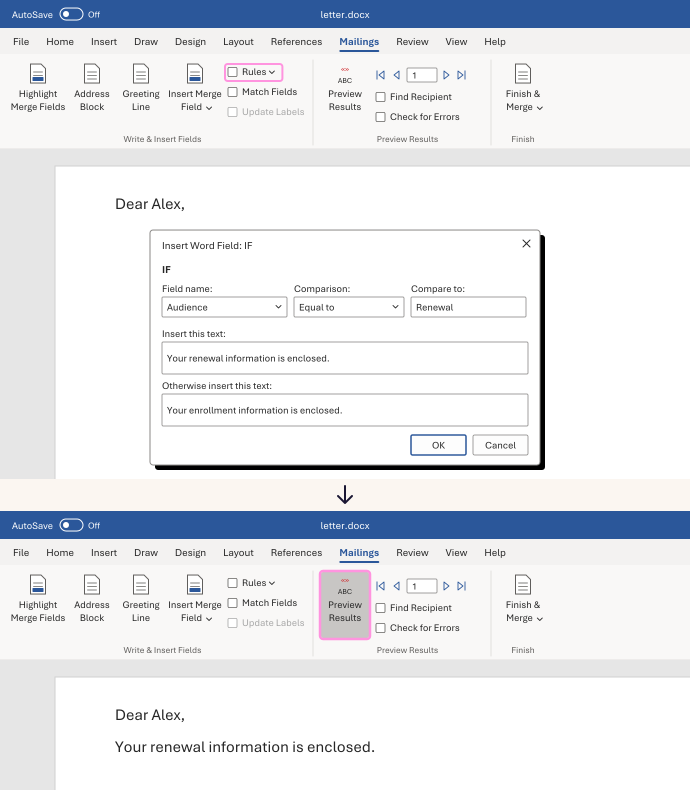
On the Mailings tab, click Rules, then If...Then...Else.
-
Set Field name to Audience, Comparison to Equal to, and Compare to to Renewal.
-
In Insert this text, type "Your renewal information is enclosed." In Otherwise insert this text, type "Your enrollment information is enclosed." Click OK, then Preview Results.
Renewal rows get the renewal sentence. Enrollment rows get the enrollment sentence.
Watch for
Every row that isn't Renewal gets the enrollment sentence, even blanks and typos. Before you merge, check that the column holds only Renewal and Enrollment.